What is TypeScript, and what problem does it solve?
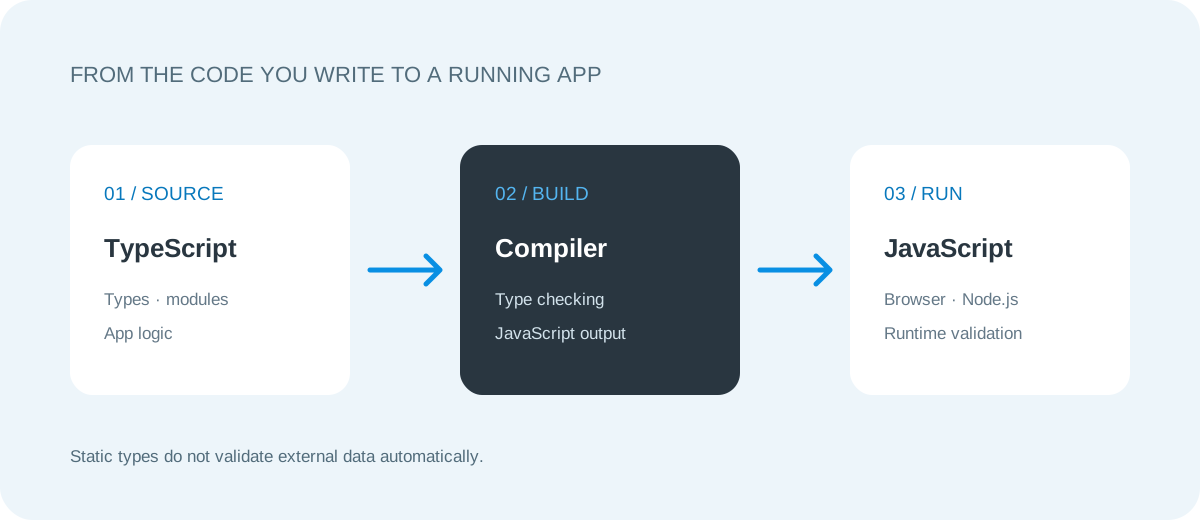
TypeScript is a programming language built on top of JavaScript: it works alongside JavaScript and compiles down to it. Its core contribution is a type checker and editor tooling that can catch certain kinds of incorrect code before the program runs. Browsers never receive TypeScript; the deployment target is still JavaScript. That distinction matters. TypeScript does not make the runtime safe on its own, it does not validate the JSON an external service sends you, and it does not fix a flawed architecture. What it does is make the developer’s intent more visible, make the impact of a change easier to analyze and provide better feedback in the editor.
The “best language” depends on the job. For a team already using React, Node.js or another JavaScript stack, TypeScript improves scalability while preserving existing packages and developer know-how. For a small throwaway script, the setup cost may not be worth it. For heavy numerical work, Python or Rust may be a better fit. When choosing, weigh team experience, runtime environment, library compatibility, deployment model and expected maintenance lifetime together; don’t decide based on a benchmark ranking alone.
Because types are erased at compile time, it is a mistake to treat type annotations as a firewall. A declaration such as type User = { id: string } does not prove that a request from the internet actually sends an id. Parsing, authorizing and validating data from the outside world happens at runtime. TypeScript helps you use that validation code consistently; it does not replace a validation library or application-level checks.
A solid start: a small, strict and understandable configuration
In a new project, decide on the runtime and toolchain first: the browser, Node.js, or both? If you use ES modules, align TypeScript’s module and moduleResolution settings with what your runner, bundler or runtime expects. Copying the same module settings for both the browser and Node is not always correct. The TypeScript Handbook’s modules guide explains why the compiler considers module format, resolution and target JavaScript version together.
A starter tsconfig.json is a good place to begin, but its settings are not a magic recipe: compare them against the official documentation for the Vite, tsx, ts-node, bundler or Node version you use. With strict enabled, missing type information surfaces earlier; noEmit makes sense when a separate tool produces the JavaScript output. target and the module settings should reflect your real deployment environment. Before disabling a setting just to silence the compiler, understand which assumption the warning is questioning.
After setup, add package scripts so every developer runs the same commands: typecheck, test and build. CI runs them and blocks the change if any fail. Alongside types, formatting and lint rules cut down on repetitive style debates in code review. But a configuration with hundreds of rules is a maintenance cost if it adds no value to the product early on. Start with a short rule set that addresses the team’s real problems, and expand it over time.
Narrowing and discriminated unions: modeling state safely
A common mistake in web applications is squeezing distinct states into one loose object or a set of optional fields. In a loading card, for example, loading, error, data and empty can end up present at the same time in contradictory combinations. A discriminated union describes each valid state as its own object shape; thanks to a literal kind field, TypeScript narrows the relevant properties inside a switch. That makes it much easier to catch invalid paths, such as trying to read a success message while still “loading”.
Don’t cast unknown external data straight to this type. Receive it as unknown first, then validate it. Think of an API’s JSON response as a triad: the server contract, the client type and runtime validation. In production these three can drift apart over time: the server may rename a field, an old client may stay in use for a while, or an unexpected null may show up. Versioning, backward compatibility and clear error messages are part of the data model.
When designing unions, prefer plain fields over clever type tricks. An exhaustiveness check with never can find an unhandled switch branch when a new variant is added. The type system helps your application logic cover every possibility, but it cannot tell from field names alone whether a business rule is correct. Verify critical decisions with tests and against product requirements.
kind carries only valid data.ts01type Result<T> =02 | { kind: 'loading' }03 | { kind: 'success'; data: T }04 | { kind: 'error'; message: string };05 06function describe<T>(result: Result<T>): string {07 switch (result.kind) {08 case 'loading': return 'Loading';09 case 'success': return 'Ready';10 case 'error': return result.message;11 default: {12 const exhaustive: never = result;13 return exhaustive;14 }15 }16}The API boundary: real validation, not type annotations
Form input, URL parameters, files, database records and HTTP responses are the outer boundaries of your application. At these points, check the shape of the data instead of assuming it. In a lightweight app, a small hand-written validator may be enough; for complex schemas and shared client/server contracts, consider tools such as Zod, Valibot or Ajv. Each brings an extra dependency, a learning curve and a runtime cost, so let team standards, the need for JSON Schema and your bundle-size budget drive the choice.
Validation doesn’t stop at “is the type right?”. You also need to check that a numeric field is within a safe range, that text respects a length limit, that the user is authorized to access the resource, and the request rate. Client-side checks exist for user experience; authorization must happen on the server. Dumping an entire sensitive payload to the console may make debugging easier, but it can leak personal data. Log the minimum necessary data and restrict access to logs.
Keeping validation in a single layer prevents different screens from interpreting the same endpoint with different rules. Tell the user which field failed and why in safe, clear language, without leaking internal infrastructure details or secrets. In good API design, an expected failure is expressed through a Result or an HTTP status code. Silently swallowing an exception and returning an empty object usually just surfaces the bug later, at a higher cost.
When the API version changes, don’t break old clients overnight. Measure a field’s usage before removing it, keep supporting the old name through a compatibility layer for a while, and document the change in the release notes. An OpenAPI schema or a shared contract file makes the agreement between teams visible, but you still need CI to verify that the schema and the implementation haven’t drifted apart. End-to-end contract tests close the gap between “the types compiled” and “the services actually speak the same JSON”. Backward compatibility matters especially for mobile apps and cached clients.
Types describe intent; runtime checks prove that data from the outside world is correct.
Errors, cancellation and race conditions in async code
JavaScript’s Promise and async/await model expresses I/O-bound code readably. TypeScript helps document return types and error paths, but it cannot guarantee the order in which two requests complete. In a search box, if a slow response to an old query arrives after the new one, stale results can appear on screen. Cancelling requests that are no longer needed with AbortController, filtering results by sequence number, or debouncing requests all address this product behavior.
When catching promise rejections, treat the error as unknown and narrow it safely. Because any value can be thrown in JavaScript, it is wrong to assume up front that what you caught is an Error. Before showing an error to the user, separate the technical log from the user-facing message. A network failure, an invalid response, an expired session and an access denial may not share the same recovery step.
Don’t solve performance problems by guesswork. A large client bundle, unnecessary state updates or expensive renders can hurt the real user experience. Measure the production build, use source maps to find heavy dependencies, and test on real devices and slow networks. The type system adds close to zero cost to the compiled output, but the validation and libraries you add do count at runtime. Don’t collapse these two into a single “is TypeScript slow?” question.
Testing strategy: type checking alone is not testing
What the compiler verifies and what tests verify are different things. Type checking can find programming errors such as wrong arguments or a missing union branch; it cannot know whether a price is rounded correctly or whether a user’s order was actually saved. Use unit tests for pure business rules, integration tests for module boundaries, and browser tests for critical end-to-end flows. Being able to explain which product risk each test reduces is what makes the test pyramid concrete.
The fact that TypeScript types exist at compile time doesn’t mean a JavaScript test runner can execute your files directly. Check the documentation of Vite, tsx, ts-node or whichever runner you choose for its TypeScript support and module format. In CI, install dependencies deterministically first, then run formatting/lint, type checking, tests and the production build. Steps that pass locally but fail in CI often point to version or environment differences.
Test edge cases deliberately: empty lists, zero, negative values, very long text, invalid UTF-8, timeouts, resubmitted requests and concurrent updates. A test suite that never exercises the error path proves nothing about success. Clocks and randomness can be controlled through dependency injection or fake services, while tests that verify real database and network behavior can live in a separate integration layer. Coverage percentage is a signal, not a quality certificate.
Accessible interfaces and maintainable components
Correctly typing a button’s onClick in TypeScript does not guarantee that the button is keyboard-operable or accessible. Semantic HTML (button, label, nav, main), visible keyboard focus, accurate accessible names and error messages all need to be designed separately. Model component APIs around real use cases: instead of adding a boolean prop for every visual detail, give variants meaningful names. An overly generic component can be harder for teammates to use.
Model the states of your UI explicitly: initial, loading, empty, success, error and cancelled. Managing the same async resource separately in many components leads to inconsistent feedback. Keep server state separate from transient form state. Add a state management library only when a real need appears (caching, revalidation, shared state, time-travel debugging and so on); reaching for the most popular package by default is not an architectural decision.
Keep type names and file structure close to the product’s vocabulary. Follow the language’s idiomatic patterns rather than repetitive prefixes like IUser, and prefer names that reveal a function’s intent. any is an escape hatch: if data can be held as unknown and narrowed, you preserve the fact that it is unknown and force a decision at every use. When migrating a large JavaScript codebase, you don’t have to convert every file at once. Use boundaries, tests and migration options such as allowJs to split the risk into small, observable pieces.
A real-world example: a content API for a Turkish portfolio
On an example portfolio or agency site, visitors search the blog, filter posts by category and submit a contact form. TypeScript adds value in several places here: it defines a shared post model for card and detail pages, expresses the language choice as a constrained tr | en union, makes filter state explicit and surfaces unexpected JSON at the service boundary. Astro or a similar static framework can generate content at build time while small client scripts handle search and filtering. There is no need to turn the whole site into a client-side application.
A simple implementation plan: design the content model and URL structure first; then render a sample post from static data; wire search and categories to keyboard-accessible HTML controls; validate data if editors supply it through an API; and check canonical URLs and metadata for each language. When you add a form endpoint, implement server-side validation, spam throttling and error feedback. Don’t move private data into the client or logs unnecessarily.
Other good project ideas: an in-browser expense tracking dashboard, a webhook receiver built with Node.js, a design system component library, an offline-capable to-do list, or a content dashboard that aggregates several APIs. Don’t add a database, a queue or microservices at the start just because the project “uses TypeScript”. Complete the core user flow first, make errors visible and collect measurements. Grow the architecture once scale or maintenance problems are real.
In a real project, even example card code should be backed by tests rather than types alone: formatDate should produce the expected output across time zones, an unknown category should fall back to a safe default, and a missing image should show a meaningful alternative. Keep track of copyright and licensing for product content and images, too. A successful example is code that not only compiles but also works in production, reads clearly on different screens and has a clear owner.

Common mistakes and a decision checklist
Top of the list is the misconception that “if I type everything, there will be no bugs”. The compiler does not guarantee business logic, permission policies, protection against SQL injection, server availability or design usability. Slapping a label on data with as User does not validate it either. Use a type assertion only when a check or a trusted producer justifies it. If ! non-null assertions and any show up frequently, revisit the data model at the boundary.
The second mistake is copying settings out of context. An application’s module format, bundler, browser support and TypeScript version are all interconnected. The third is using complex generics everywhere: if an abstraction doesn’t capture a recurring business rule or provide a safer API, it can hurt readability. The fourth is skipping production validation for the sake of a fast build; the fifth is testing only the happy path.
Before deciding, answer these questions as a team: Which JavaScript runtime are you targeting? Are the type definitions of your dependencies reliable? Are the build and test commands the same in CI? Where are HTTP and user inputs validated? Where do loose types concentrate in the codebase? What problems do source maps and error reports reveal? Is the build time acceptable as the project grows? The answers determine where TypeScript should be strict and where it can be flexible.
Ultimately, TypeScript is not an escape from JavaScript; it is one of the tools for keeping large, evolving JavaScript programs understandable. Strict initial settings, small and accurate data models, runtime validation at the outer boundary, meaningful tests and clear error handling work together. Once these foundations are in place, the choice of tools—React, Vue, Svelte, Astro, Node.js, Deno or something else—can follow the product’s needs. The choice of language alone doesn’t determine success; the quality of the team’s decisions and sustainable practices do.
Official sources and further reading
To verify technical behavior against primary sources and deepen your understanding through practice:
- TypeScript Handbook: Modules
- TypeScript Handbook: Narrowing
- TypeScript Handbook: Generics
- TypeScript: TypeScript for JavaScript Programmers
- MDN: Fetch API
These sources are the primary documentation for the relevant language, standard library or tool. For details that vary between versions, rely on the documentation for the version your project uses.