When is Python the right tool?
Python is a general-purpose language used for a remarkably wide range of work, thanks to its readable syntax, extensive standard library and ecosystem spanning scientific computing, automation, web and data engineering. Being able to write small tasks quickly makes it easier to validate a prototype with users early. That speed isn’t just about lines of code: package choices, the deployment environment, data security, observability and maintenance all count toward delivery time. Teams that pair Python’s flexibility with discipline can build reliable services.
Not every workload suits Python equally well. For I/O-bound work that waits on the network or disk, async I/O or threads can help. For CPU-heavy computation, pure Python loops can hit their speed ceiling quickly; you may need a better algorithm, optimized libraries such as NumPy, multiple processes or a different runtime. Profile with real data first, then target the bottleneck. Don’t complicate the product unnecessarily based on the language’s hypothetical speed.
Distinguish language features from libraries and frameworks. Django, Flask, FastAPI, Pandas and PyTorch are not Python itself; they are packages serving different problem domains. Choose a framework based on team skills, ecosystem, deployment, async needs and maintenance requirements. For beginners, learning the fundamentals first—data structures, error handling, testing and packaging with the standard library—makes the move to a framework much smoother.
Project structure and virtual environments: maintenance work for day one
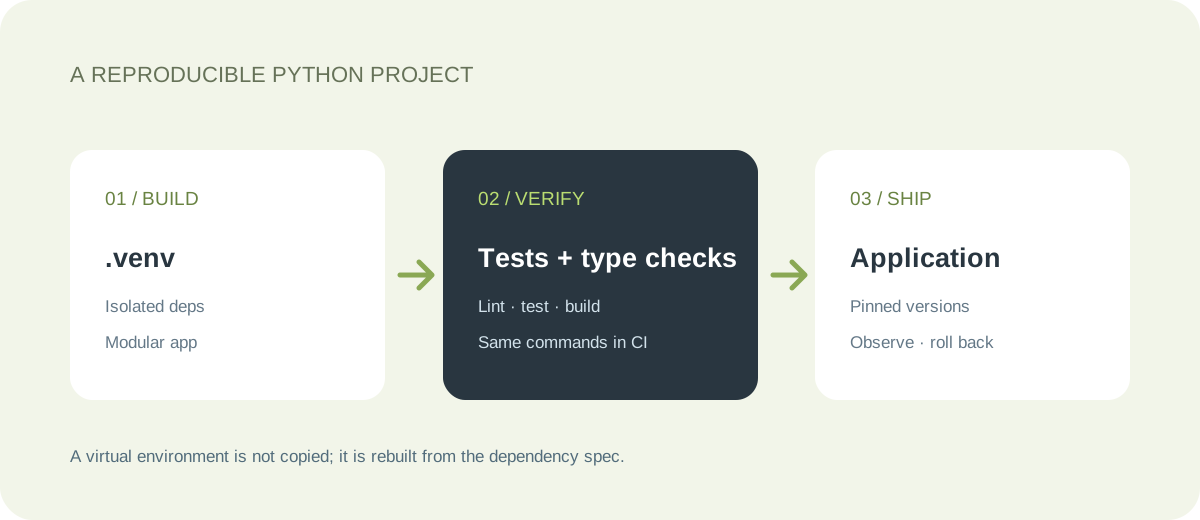
Create a separate virtual environment for every project. That way one application’s library versions don’t change another project’s dependencies, and reproducing the setup on production and developer machines becomes easier. Python’s built-in venv module creates lightweight environments. Don’t commit the environment directory (.venv) to git: an environment is tied to the operating system and the Python installation, so recreate it from locked dependencies instead of copying it around.
The setup commands differ slightly by platform. In Windows PowerShell, you activate the environment with .\.venv\Scripts\Activate.ps1; on macOS/Linux, with source .venv/bin/activate. Activation only changes which environment the terminal’s python and pip commands use. If your organization’s policy restricts PowerShell scripts, call the environment’s interpreter directly; loosening the security policy without oversight is not a solution. After setup, using python -m pip reduces the chance of running the wrong pip.
Split modules by responsibility, but don’t create dozens of packages on day one. A small service can start with src/app, tests, pyproject.toml and a short README. Read configuration from environment variables; never put real secret values in source code or example files. As needs grow, separate configuration, data access and the HTTP layer. Follow PyPA’s current guide for package management; the roles of requirements.txt, pyproject.toml and lock files can vary depending on the tool you use.
Type hints: keeping intent explicit without losing flexibility
Python remains dynamically typed; type hints such as name: str express the code’s intent and strengthen editor support through static analysis tools. The standard Python interpreter does not automatically enforce these annotations. Adding tools such as mypy, Pyright or Ruff to a project is a separate quality step. Run them in CI with settings your team keeps under version control; a command someone forgets to run on their machine gives false confidence about type coverage.
The best type design expresses the real business contract. A dataclass for simple data objects, an explicit parsing/schema layer for external JSON, and Enum or Literal for a handful of valid states can all help. A cast is not validation: typing.cast does nothing to the object at runtime. Instead of declaring an API value a User through annotation alone, check it for missing and invalid fields. Validation tools such as Pydantic provide field checks, error reporting and serialization, but not every project needs them.
Liberal use of Any silences static checking and makes the cost of flexibility invisible again. If Any arrives at a library boundary, convert it early to object or a concrete type. An overly elaborate generic protocol design can easily make a small script harder to maintain. Focus typing on documented public APIs, interfaces between teams and logic that is most likely to produce bugs. If the annotations are longer and more complex than the code, prefer a simpler model.
01from decimal import Decimal02 03def net_price(gross: Decimal, tax: Decimal) -> Decimal:04 if gross < 0:05 raise ValueError("gross must be non-negative")06 if not Decimal("0") <= tax <= Decimal("1"):07 raise ValueError("tax must be between 0 and 1")08 return gross / (Decimal("1") + tax)09 10# For monetary values, using Decimal instead of float11# does not remove the need for a rounding policy;12# define the currency and legal rules separately.Error handling and data validation
Exceptions are Python’s normal error-handling mechanism; handle expected failures meaningfully instead of silently swallowing them. When a file isn’t found, you may need to ask the user to check the path; on a database connection error, an automatic retry may be appropriate; for an unauthorized request, retrying is neither safe nor meaningful. Broad catches such as except Exception: pass let the program hide the error and carry on with a wrong result. Log caught exceptions with their context and produce a safe message at the right layer.
Data from files, HTTP, forms and the command line is untrusted input. Size limits, expected formats, empty values, numeric ranges and authorization should be checked layer by layer. Keep data validation separate from business-rule checks: a plausible-looking email format doesn’t prove the user owns that address, and an ID being a number doesn’t grant permission to view the record. Use parameterized APIs for SQL queries. Don’t put passwords, access tokens or unnecessary personal information in logs.
Python’s context manager pattern (with) makes the lifetime of resources such as files, locks and connections explicit. Rather than hand-writing open/close logic, use with open(...), and close database sessions according to your framework’s guidelines. Resources must be cleaned up even if the work is interrupted. A finally block is still needed in some low-level cases, but when an object already supports resource management, a context manager is both shorter and safer in the face of errors.
A simple Python solution keeps its path to production open when it starts with safe inputs and a reproducible setup.
Testing and quality gates: from small functions to service flows
Python’s standard library includes unittest; in many projects, tools such as pytest make tests shorter to write and fixtures easier to structure. Whichever you choose, follow your team’s existing standard. Keeping business functions as independent of external services as possible lets you test every logic branch quickly. In unit tests, check the result the product delivers, not the internals of a client library. For database integration, use a real test database or fake the dependency explicitly—and don’t treat one kind of test as a substitute for the other.
Test names should describe the expected behavior: an invalid tax rate raises an error, a missing user returns 404, a time-zone-aware date is stored consistently. Test limits and failures as thoroughly as the happy path. Random samples, the file system, the system clock and network results can make tests nondeterministic. Abstract them away or use controlled fixtures. If a failing test passes when you rerun it, the flakiness isn’t fixed; you still need to find the underlying ordering or shared-state problem.
A quality gate can run format, lint, type checking and tests in CI with pinned versions. A single tool such as Ruff covers several lint and formatting tasks at once, but tune the selected rules to your project. For security, keep dependencies up to date, check the maintenance and license status of the packages you use, and run automated scans regularly. Keep CI simple enough to set up in the first week and fast; a ten-minute pipeline on every commit pushes developers to work around the rules.
Async Python: when to use asyncio, and when to keep it simple
asyncio lets you write cooperatively concurrent I/O code with async/await. Calling a coroutine doesn’t mean its work is done; to run it, you have to await it inside an event loop or schedule it as a task. When you have many simultaneous HTTP requests, WebSocket connections or database I/O operations, the event loop can make efficient use of waiting time. asyncio.run() is the typical top-level entry point of an application. In modern Python, structured task groups make it easier to await related tasks and handle their errors together.
Async does not magically parallelize CPU work. A long-running blocking function on the event loop stops every other coroutine from making progress. For that kind of work, offload blocking I/O with asyncio.to_thread where appropriate, use a process pool, or hand the CPU-bound algorithm to an optimized library. Set concurrency limits; launching thousands of URLs as unbounded tasks can exhaust memory, the remote service and file descriptors.
If the first version reads clearly as a simple synchronous function, don’t add async infrastructure. Check whether your dependencies genuinely support async: using a blocking database driver with an async web framework can wipe out the scalability you were hoping for. Design for timeouts, cancellation, retries and partial failures from the start. When testing async code, don’t settle for purely mock-based examples that ignore real event-loop constraints. Use the framework’s test client and production-like integration tests.
Example project: a secure web service that generates CSV reports
A realistic starter project is a small API that produces a product report from an uploaded CSV file. The user submits the file; the service validates the header row, enforces row-count and size limits, parses numeric fields and reports invalid rows. Python’s csv module may be enough for the first version. If data volume and column transformations grow, Pandas or Polars are worth considering. When choosing a new dependency, benchmark it against your data size, memory usage and deployment environment.
Keep the architecture small: the HTTP layer handles authentication, file intake and response codes; a service function validates rows and applies business rules; a storage layer persists the result; and, if needed, a worker processes long-running reports in the background. Making the HTTP request wait for processing to finish can cause reverse-proxy timeouts and client disconnects. Add a job queue only when the process is genuinely long-running and safely retryable. In the first version, writing background jobs to the database and processing them with a simple worker may be enough.
The test suite covers empty files, wrong encodings, unexpected columns, duplicate records, very large files, decimal separators and interrupted uploads. Never trust the file name as a disk path; never serve user files from the web root in a way that makes them executable. Clean up temporary files and restrict record access per user. If a single service is enough for low traffic, there is no benefit in building a microservice architecture. Measurements and requirements come first; the decision to add more components comes after.

Which other Python projects make good learning ground?
A personal file organizer can safely scan folders and find duplicate files by hash. Offering a dry-run report first, rather than deleting on the first pass, reduces user error. A small price-tracking service can fetch data from a public source at intervals that respect its terms of use and chart the history. Don’t start scraping before reading the provider’s terms and rate limits. A CSV/JSON converter is great practice for character encodings, date parsing and testable functions.
A content product that needs an admin panel and a database with Django, a tiny webhook receiver with Flask, a type-annotated API prototype with FastAPI, and exploratory analysis with Jupyter are all different starting points. Don’t add every framework to the same project. Choose based on purpose, deployment platform and team experience. If you’re developing a Python package, learn about versioning, API compatibility, licensing, building wheels and verifying installation in a clean virtual environment.
In a beginner’s portfolio, a working demo, a README, sample input/output, tests and a short section explaining limitations send a stronger signal than five different frameworks. Setup commands should be tried from scratch on another machine. Don’t store personal data in a demo test account. As you approach production, you can add Docker or platform packaging, database migrations, logs/metrics and a backup plan. Implement these when the application actually requires them, not just to show off what you’ve learned.
Performance, deployment and security
Define your performance metric first: per-request latency, memory, file size or batch duration. timeit can compare small snippets; finding a real application bottleneck requires a profiler, application metrics and production-like data. An N+1 query against the database usually matters far more than a few microseconds in a Python loop. Caching introduces inconsistency and invalidation costs, but it can help with a measured, repeated, expensive computation.
Never run a development server in production. Configure the production server, worker model, reverse proxy, HTTPS, health checks and shutdown behavior according to your target platform’s current documentation. Pin or lock Python and package versions, and keep track of security updates. Plan the order of migrations before the application starts, and test the rollback path. Environment variables alone are not a secrets management system; make sure deployment logs and CI access are protected too.
Don’t disable your framework’s built-in security protections: CSRF, cookie security, CORS and SQL parameterization are all separate concerns. Insert user input into HTML safely, limit file uploads, and add rate limiting and authorization. Keeping the number of dependencies low shrinks both the attack surface and the upgrade burden. Check how current and well maintained a library is, and never install unfamiliar package names automatically.
Common mistakes and a learning path
Common mistakes: using the global environment for every project; catching an exception and doing nothing; doing monetary math with float and forgetting the rounding rules; inserting user data into SQL or HTML without validation; mixing async syntax with blocking libraries; cramming the whole application into one giant file; and testing only the happy path. The fix for none of these is a new framework. Clear module boundaries, small functions, the right data types and measurable tests are usually far more effective.
A suggested learning path: Python’s core data structures and functions; error and resource management; modules and packages; venv and packaging; unit testing; HTTP/JSON and databases; type hints and static analysis; logging and deployment; and then, as needed, async, data science or machine learning. Ship a small working product at each step. Copying tutorial code is natural at first, but knowledge doesn’t become practical skill until you can change something and explain why it still works.
When choosing learning resources, check the Python version explicitly. The current official Python documentation and the packaging guide should be your primary references. An old blog post may describe module behavior from another version or a package installation method that is no longer recommended. PEPs explain the reasoning behind language and standard library decisions; the PyPA guide focuses on package distribution. Framework documentation should match the version you use. Instead of memorizing “this is how Python works”, note which version or tool a behavior applies to.
Python’s greatest strength isn’t that it applies the same way to every domain, but that it offers a broad ecosystem for solving problems with readable code. A proper virtual environment, clean module boundaries, type hints, runtime validation, meaningful tests and controlled deployment build trust together. What should grow a project is measured user need, not feature count. Start small, test the real workflow and weigh the maintenance cost of every tool you add.
Official sources and further reading
To verify technical behavior against primary sources and deepen your understanding through practice:
- Python Tutorial
venvdocumentation- Typing documentation
- asyncio: Asynchronous I/O
- Python Packaging User Guide
- Python unittest
These sources are the primary documentation for the relevant language, standard library or tool. For details that vary between versions, rely on the documentation for the version your project uses.